How to use WhatsApp Web in any browser
Do you need to use WhatsApp from the web? Using WhatsApp Web offers a way to use WhatsApp chat on any device with a web browser, regardless of what or where you are.
WhatsApp is perhaps one of the most popular instant messaging platforms worldwide, and although it is a messaging application designed for smartphones such as iPhone and Android, it can be accessed from any device with a desktop web browser, thanks to WhatsApp web. This article will show you how to use WhatsApp Web to chat in a web browser from any device.
Are you interested in setting up and using WhatsApp web on your computer, iPad, tablet, Chromebook or other device with a web browser? Then you are in the right place, as we will discuss how you can use WhatsApp web in any web browser that is currently available.
How to use WhatsApp Web in any browser
Regardless of whether you are using Google Chrome, Firefox, Opera, Microsoft Edge, or any other web browser, the procedure remains the same. So, just follow the steps below carefully to configure and use the WhatsApp website without any problem.
- Open the desktop web browser you normally use and go to web.whatsapp.com.
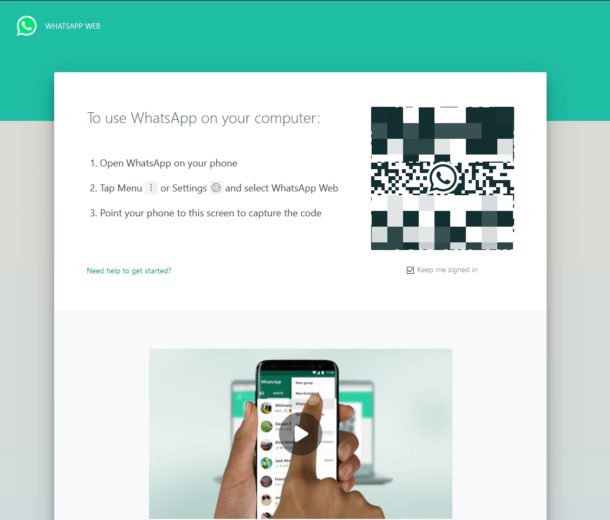
- A QR code will be displayed on this page which must be scanned with the smartphone application. So, open "WhatsApp" from the home screen of your iPhone or any other smartphone.

- You will be taken to the Chats section as soon as you open WhatsApp. Go to "Settings" to configure the WhatsApp website.

- Now, just tap on “Whatsapp Web / Desktop” as shown in the screenshot below.

- This will open the in-app QR code scanner. Point your phone's camera at the QR code displayed on web.whatsapp.com and wait a few seconds.

- The web browser will now refresh the page and display your recent chats.

And that's it, you are using WhatsApp on the web!
Make sure that your phone remains connected to the Internet to continue using the web client to synchronize messages, otherwise it will disconnect and you will not be able to see the new text messages you have received. This could be a deciding factor for some people who were looking for a separate solution that does not require a smartphone, but that is technically not possible at the moment, perhaps in the future it will be an available feature.
WhatsApp Web is useful in many situations you don't normally expect, apart from just chatting too. Suppose you have some photos that you took with your DSLR camera stored on your computer. You don't need to transfer these photos to your phone before sending them to your friends on WhatsApp, as you can simply use the web client or the desktop application to quickly share images in seconds.
Not very interested in using a web browser to access WhatsApp? Just download WhatsApp Desktop which is available for Mac and Windows PC. Setting it up and using it is exactly the same as Whatsapp Web, but it eliminates the need to have your browser open. That said, a dedicated non-smartphone based app for syncing messages has been one of the most requested features for a long time, but until then, this is as close as possible.
Also, if you use WhatsApp as your primary messaging platform, you may want to back up your chats to iCloud to make sure you don't lose all your conversations due to uninstall or corrupt software update.
Introduced a few years ago, the WhatsApp web client allows you to stay connected with your friends, family and colleagues, even if your eyes are not glued to the phone. It is extremely useful when you are at work in front of the computer, because you don't even have to take the phone out of your pocket to respond to messages. Also, if you have an iPad or another tablet, you can also access WhatsApp using the web browser. It is a really useful feature that you will surely use if you are a WhatsApp user.
We hope you have successfully configured WhatsApp Web on your computer or iPad. What do you think of this web-based solution that looks more like a companion app than a dedicated one? Do you see yourself using WhatsApp Web or Desktop regularly on a long-term basis? Be sure to let us know your thoughts and opinions in the comments section below.


Comments
Post a Comment